
It's Alive... It's Alive...
Overall
Summary
I can proudly say that Asus is one of the best in motherboards…
Pros
Smooth running and reliable…
Cons
None at all…
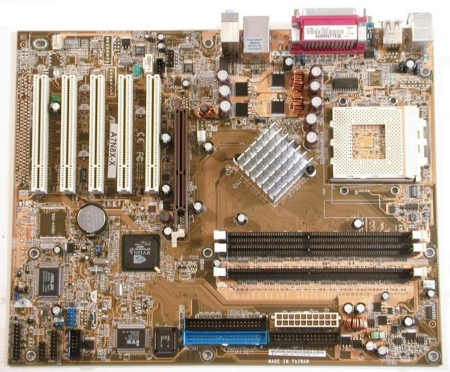
Almost a year ago I built my first computer; it was my first build. I had gathered up all of the parts and one day when everything was in place I put it together. One of the components I bought for this new system was this new (at the time) Asus A7N8X motherboard. I chose the Asus brand because my best friend built his own computer and he used this brand; he recommended it to me.
I used the AMD Athlon XP 2500+ processor on this motherboard. Another reason for getting this board was the price; I was on a budget and wanted to get the best possible value for my money. After all, it was my first build and I wanted to make it as fast and powerful as possible without going broke.
MAIN FEATURES
The A7N8X supports 3 GB of 184 pin DIMM memory which can either be 400 MHz, 333 MHz, 266 MHz, or 200 MHz. It has an 8x AGP slot for fast graphic performance. This is just a regular motherboard for everyday use so you probably will not notice anything special.
SYSTEM SPECIFICATIONS
| Motherboard | ASUS A7N8X |
| CPU | AMD Athlon XP 2500+ |
| RAM | PNY PC2100 512MB x 3 |
| Graphics Card | nVidia GeForce4 MX 440 64MB |
| Storage | 40GB 7200RPM Western Digital 160GB 7200RPM Western Digital |
| Operating System | WindowsXP Pro SP2 |
| Display | Viewsonic 17" |
INSTALLATION
Hardware
The A7N8X is compatible with the ATX form factor which should fit any current ATX case. Installation from that side is somewhat standardized and the motherboard did not create any complications for me. But since it was my first time I had to read the manual and plan everything out beforehand.
This motherboard requires an ATX 20 pin power connector to work properly. Since I purchased a new ULTRA PRODUCTS X-Connect 500W ATX power supply, I was all set for this motherboard. This power supply has all the connections and the power I will ever have a need. The power supply features modular connectors so you only use the cables that you need and store the rest someplace else.
The mechanical installation for this motherboard is no problem since all screw positions (to hold it in the case) are freely accessible even with CPU and RAM already installed. Just make sure to screw it in before you install the heat sink because it may make it difficult to tighten some of the screws. Also, watch out for the screws you use since neither motherboard nor case goes into too much detail about which screws to use. The ones that fit the studs for the motherboard are the ones with the Hex/Phillips head.
I used three PNY PC2100 512 MB memory sticks to go with this motherboard as I wanted great performance out of this new system. The first boot was no problem and I just proceeded to install the operating system. I did overclock the processor (AMD Athlon XP 2500+) from 1.87 GHz to 2.2 GHz.
I had to read the manual to learn what each of the Bios settings did and configured it to what I wanted it to do. The Award BIOS offers great flexibility and can be updated via a variety of sources (Bootable Floppy, or Asus Update utility). I like to use the Asus Update utility to flash the bios with the latest updates, it is quick and simple to use and it works right from the Windows environment.
Software
The driver CD has all of the software needed to make the board compatible with your operating system. Just insert the CD and follow the instruction on the screen. It takes about 10 to 15 minutes for the whole driver installation process to complete (including a restart).
I installed the 32-Bit version of Windows XP Professional. During testing, it turned out to be very stable already and all programs ran without any problem. I did notice a major speed increase from my older computer.
Now that the system seemed to work, I went ahead and downloaded all updates for Windows XP (including SP2) and the latest driver updates for this motherboard. This is a lengthy process since Windows XP alone has a lot of critical updates (which includes SP2) that is supposed to make the system more secure. But I think the updates made my system run slower (maybe next time I will skip all updates except for SP2). The whole process takes a good hour or two. If you do not want to spend this time downloading and installing, you can just purchase a Windows XP version that already comes with SP2 and a lot of other updates.
Once I had all my software and drivers installed, I did not have any problems with locking up and neither did I get any BSD (Blue Screen of Death) errors.
PERFORMANCE
Now that everything is in good working condition, it is time to harvest the fruits of the 3 – 4 hours of hard labor for setting up the system. I agree that some of the appreciation goes to the graphics card (Nvidia GeForce4 MX 440), but overall speed improvement over my old system (Intel-based) is highly noticeable and expected. I have reduced my boot-up time from somewhere over two minutes to about 45 to 50 seconds which is very nice.
Overclocking is an easy way to get a bit more performance than the components are rated for. Even though this motherboard allows the processor to be overclocked much higher, I got it to an additional 17% which is very good; I do not want to exhaust the processor just yet.
FINAL THOUGHTS
I was planning to upgrade my video card and get the newest PNY Verto GeForce 6800 GT 256 MB. I knew that an AGP board is not the future of motherboards (the new SLI boards are available), but I just wanted to get my foot in the door so that I can experience the soon to be history first.