
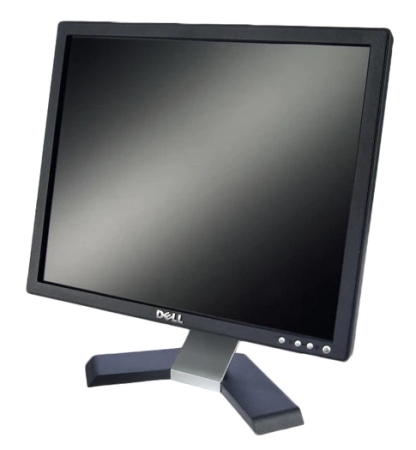
A simple monitor for simple jobs...
Overall
Summary
This Dell surprised me with it’s quality.
Pros
Small, very light weight, bright, and sharp…
Cons
None at all!
I had been using the Samsung SyncMaster 763 MB 17″ CRT (cathode-ray tube) Monitor since I started working for this company of mine (about three years ago), but they had been using it way before I even knew about the company.
After so many years, they finally replaced it with this new Dell E176FP 17” LCD (Liquid Crystal Display) monitor. You cannot imagine how delighted I was to rid my desk of that bulky old box that they call a monitor. Now I have this new thin and sleek LCD to treat my eyes with. This new Dell is much brighter, sharper, lighter, simpler, and not to mention a lot thinner. I now have more room on my desk for more… umm… important things (yeah that’s right). The regular retail price for this monitor is around two hundred dollars, but we actually purchased it with a desktop package. I got to keep the monitor and someone else got the other half of the system (but that’s not important). We purchased it directly on Dell’s website and everything arrived in about five or six business days.
There are a few reasons I got this monitor and not the other person. You see I was taunting my boss every day about my monitor being bad, blurry, and some other excuses that I choose not to remember anymore. So when it came time for the owner of my company to get a new computer, I jumped in and presented my argument about my old monitor. Plus the owner (big boss) already had an LCD monitor.
FEATURES AND DESIGN
If you look at it from the front, it looks just like any other monitor. This is a very simple 17-inch monitor and this is exactly what I need at work. The maximum resolution for this LCD monitor is 1280 x 1024 at 60 Hz. The contrast ratio (information representation against a darker background) is 450:1 which makes it brighter and much sharper than the old Samsung. You can easily adjust the brightness and contrast using the plus (+) and minus (-) buttons on the front panel of this monitor. This monitor also has an aspect ratio of 5:4. This means it is a regular monitor and not widescreen.
This particular unit has a black front and back panels; we actually did not have a choice of color as this was a package deal (but it matches with everything else on my desk). The control buttons on the front panel are very simple to and do exactly what you think they would do. There is a Power button to turn this monitor on or off, a Menu button to access the OSD menu and adjust the settings to your specifications, a minus button that will allow you to adjust the brightness and contrast, and a plus button that will initiate the auto screen adjustment feature (this always gets my screen all wrong). The power button also has a built-in LED light to indicate if it is on or off.
INSTALLATION
This is an analog LCD with a 15-pin mini D-sub connector that will connect to and VGA video card on your computer. Installing this monitor was very simple; all you have to do is attach the monitor to the base stand, plug in the power cable (3-pin AC), and the VGA cable. The package comes will all the necessary cables and connectors. I did not even spend 5 minutes installing this monitor because it is just so simple to set up. If you are running Windows XP you will not need any drivers; in fact, you may not need drivers even if you do not, but it does come with a CD with drivers just in case. One thing I wish this monitor came with was software that would control the contrast, brightness, size, position, and all without needing to use the buttons on the front panel (the Samsung’s have something like that I believe).
DIMENSIONS AND OTHER MEASUREMENTS
This monitor weighs only about 8.8 pounds (it’s only a 17-inch monitor after all) when it is out of the packaging. I am glad I got rid of the bulky and heavy CRT monitor from my desk. Now I will not have to break my back when I have to lift or move this for various reasons I do not wish to disclose (for cleaning). This monitor is about 14.8 inches wide, about 15 inches high, and 5.5 inches in depth without the packaging. Basically all I can say about the size is that it is a nice small monitor and very lightweight monitor. The base is there to hold the monitor upright, but it can also be mounted on the wall or one of those swivel things that you can install on the wall when combined with the appropriate accessories.
WARRANTY INFORMATION
Well, since we purchased the desktop package we got a different warranty deal. Dell provides a 1Yr Ltd Warranty, 1Yr At-Home Service, and 1Yr HW Warranty Support for all parts and labor. For information on obtaining warranty service please visit dell.com or call 1-877-585-7477.
PICTURE QUALITY
The Dot Pitch (a measurement that indicates the diagonal distance between like-colored dots or pixels) on this monitor is 0.264 (mm); the lower the number the crisper the image. So far I have viewed pictures, browsed the mighty Internet, and played some games (during breaks of course) but I have not had any hard times seeing what I was needed to see on this monitor. The display is bright and excellent which is never extra blurry or extra sharp; it is always just right. At night with no lights on, I have to reduce the brightness and contrast to make my eyes comfortable, and during the day or when the lights are on, I can turn them both all the way up and I have no problems what so ever. If you are like me and are switching from a CRT monitor then you will notice the improvements in quality, contrast, and brightness. If you are upgrading from another LCD monitor then you will just be happy with the improved display quality of this monitor.
EXPERIENCE
I have been using this Dell monitor every day since we got it almost a month ago. Now I can see much clearer and everything is much smoother. I do a lot of typing, spreadsheets, and website editing and this monitor makes everything much more readable. The older Samsung CRT monitor used to have blurry text when I was on the internet or when I zoom in and out. This monitor also saved a lot of room on my desk so now I have space for more important things like a picture of my lovely wife. I have never had a problem with the monitor heating up like the CRT’s do sometimes.
FINAL THOUGHTS
This new LCD monitor is high quality and simple display that you will never be disappointed with. The picture quality is better than I expected because I am not too fond of Dell equipment, but this has will definitely allow me to at least give them a chance now and than. One thing I have come to know from personal experience is that brand names like Viewsonic, Samsung, and Sony will never disappoint you with their products, but there are other brands that are cheaper and provide about the same quality. I have used all three of these for a long time now and will recommend them to anyone who wants a reliable and long-lasting monitor for either their home or office. Plus, now is the best time to switch to widescreen LCD monitors because you want to be ready for the future and the prices are dropping fast.