
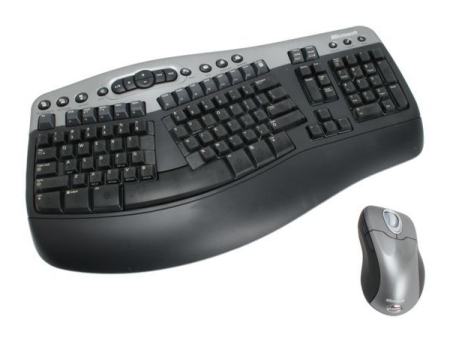
Aww... what a cute couple...
Overall
Summary
Quiet and comfortable input devices for your computer…
Pros
Comfortable, easy installation, easy to use, and lots of useful features…
Cons
No on/off buttons (shuts off automatically)…
Guess what I got for Christmas this year? Yup, you got it right—I got this Microsoft Optical Desktop Pro keyboard and mouse set from my wife. She knew I wanted this because she notices that I had been looking at this for a while know whenever we went to CompUSA. I was very eager to try this out, and this review is one of the first tests I am putting it through. Nowadays, more and more devices are going the wireless route and I thought it was a good time for me to move on with the technology as well.
INSTALLATION
Since there are only three things to work with, the installation was really simple. All I had to do was plug in the wireless receiver into the mouse and keyboard connectors (or USB) in the back, put the batteries in the mouse and keyboard, turn on the computer, insert the driver CD, and install the software/drivers. After restarting, the whole setup worked perfectly as it was supposed to.
WHAT’S HOT?
The biggest sales pitch for this keyboard and mouse is the wireless capability. And all the other gizmos just add more things to play around with. Wireless technology is a fairly new technology that is quickly heating up the plate in this mutually fast-evolving world of computers. I have always liked the idea of fewer wires to mess around with and this set is all about fewer wires. I personally have lots of things connected to my computer which obviously results in lots and lots of tangled wires and cables. So two fewer wires really make my desk a lot less tangled.
I also like the quiet keys on the keyboard so when I type, I will not disturb my wife in the next room trying to read something. The quick programmable buttons on the top of the keyboards are nice as it puts your most used features only a keypress away. I chose this ergonomically designed keyboard because I had been using one for three years or so and I was used to it. The split keys and slightly sloped shape supports your hands, wrist, and forearms to provide maximum comfort.
The mouse is nicely designed so your hand or palm will rest comfortably on it. I also like the horizontal scroll feature (tilt wheel technology) of this mouse that I did not have with my old wired mouse. The two programmable side buttons are a nice touch to this mouse; you can easily program it to zoom in or minimize all windows and show the desktop and back. In fact, all five buttons on the mouse are programmable. This mouse features a high definition optical technology that has 1000 dots per inch resolution for precise cursor control. This is a right-handed mouse and the buttons are placed just in the right places. The top of the mouse has two buttons and a scroll wheel which also tilts side to side for horizontal scrolling. The two buttons are like most other mouse buttons for left and right-clicking. Another reason I wanted this particular brand and model is that they use regular double A (AA) batteries. I do not like to have to recharge when the batteries die; I just want to be able to replace and get on with my business.
WHAT’S NOT?
To tell you the truth, I have not encountered anything about this set that I do not like. I mean I have noticed that some keys are placed differently (like the End key is no longer above the Delete key, instead it is on top of the page up key; they did make the PrtScn/SysRq/Insert in one) but that is nothing to worry about. Also, I wish there were on/off switches/buttons on the keyboard and mouse so I would be in control of when to turn them on or off; I am not saying that they should take out the auto on/off features. Other than that, I have nothing else that would worry me.
EXPERIENCE
I used everything as specified in the installation manual and every component that came in the package because they are specifically designed for this set and they would work better with it and also installation would be easier. I was glad that I did not have to provide additional power to the receiver because I definitely do not have any spare outlets available (since my two external backup hard drives are using a couple of them). I just tried this set with my laptop and I did not need the receiver; they both worked perfectly without any problems.
The logo on the box suggests that this mouse and keyboard will also work on a Mac system, but I cannot say how easy or hard it is to set up, or if all the features work in the same manner for that matter. All I know is that it is possible to use it on a Mac.
I really like this mouse as it fits comfortably under my palm; I also have a smaller version for my laptop which is perfect for a mobile system. This mouse is about twice the size and I would not recommend it in a mobile environment. One thing I like about it is that it shuts off automatically when not in use for a period of time (I am pretty sure how that works); it turns on again when you move it again.
FINAL THOUGHTS
I would highly recommend this mouse and keyboard set from Microsoft to everyone who wants to upgrade to the new wireless technology because this is easy and comfortable to use and quick to install. Even though I think it is missing a feature or two here and there, I still think it is a very good set. Even for the high price tag, I would recommend this over other similar brands. I have tested many other brands like Logitech, but like the design and comfort of this product better.