
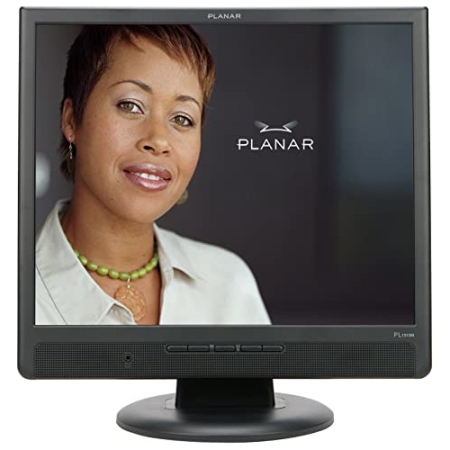
Perfect for any office or cube!
Overall
Summary
Simple and easy to use!
Pros
Big screen, light weight, and crystal clear…
Cons
It is not Wide Screen…
As you may already know, I use the Viewsonic 2012WB 20.1″ Widescreen LCD monitor at home so it would take a lot for another monitor to impress me.
You may also know that I have just started a new job and with new territory comes new… “equipment”, of course. Well, you will see me reviewing a lot of the equipment that I use at work and one of which is this huge 19-inch Planar PL1910M LCD monitor. I have this monitor standing tall on my desktop (as in desktop computer; we’ll get to that later). I don’t really know how much this cost because it was already in my cube when I joined.
FEATURES AND DESIGN
This monitor looks simple and very similar to any other LCD monitor from the front and it is also simple to install and use. As per the specifications, the maximum resolution for this monitor is 1280 x 1024 at 75 Hz. The contrast ratio (information representation against a darker background) is 700:1 which makes it bright and sharp. The contrast and brightness can easily be adjusted using the ‘<‘ or ‘>’ buttons under the ‘Fn’ sign on the front panel of this monitor. The aspect ratio of this monitor is 5:4, which means it is a regular monitor and not a widescreen display like my 2012WB.
This particular unit is black all around except for the display area of course. I think it comes in different colors but black looks better on my desk and in any business environment. It also matches great with my PC, keyboard, phone, and all my desk-top decorations (supplies). The control buttons on the front panel are very simple to use and they do exactly what you think they would do. There is a Power button to turn this monitor on and off, and two sets of ‘<‘ and ‘>’ buttons (one set under the ‘Fn’ sign and the other under the ‘+/-‘ sign). The buttons under the ‘Fn’ sign brings up the OSD menu and control the navigation through it. The other set controls the values of each of the options in the menu (such as the brightness, contrast, and sizes). There is an “Auto Adjustment” option in the OSD menu that will size the screen appropriately. The power button also has a built-in LED light to indicate if it is on or off.
INSTALLATION AND THE PACKAGE
Well, I didn’t install my monitor but I install these on other people’s desks all the time so I can say with confidence that it is painless to install. Installing this monitor was very simple; all you have to do is attach the monitor to the base stand, plug in the power cable (3-pin AC), and the VGA or DVI cable. Just set it and forget about it. This monitor has both analog (15-pin D-sub VGA) and digital (DVI) connectors. Depending on the type of video card you have, you can choose which one to use
The package comes with all the necessary cables and connectors (an AC cable, a VGA cable, a DVI cable, and an audio cable). Did I mention that this monitor has built-in stereo speakers that you can connect to your PC with the supplied audio cable? It only takes me about 2 to 3 minutes to install this monitor and have it working properly. If you are running Windows XP you will not need any drivers; in fact, you may not need drivers even if you are not, but it does come with a CD with drivers just in case. One thing I wish this monitor came with was software that would control the contrast, brightness, size, position, and all without needing to use the buttons on the front panel.
DIMENSIONS AND OTHER MEASUREMENTS
This monitor weighs only about 12.1 pounds (which is not bad for a 19-inch monitor) when it is out of the packaging. It helps when I have to carry it to our other building which is about a 2-minute walk. I am glad I don’t have to break my back to lift and carry these around. This monitor is about 16.6 inches wide, about 16.4 inches high, and 8.3 inches in depth without the packaging. Basically all I can say about the size is that it is a big and lightweight monitor without the big weight. The base is there to hold the monitor upright, but it can also be mounted on the wall or one of those swivel things that you can install on the wall (with the proper accessories).
DISPLAY QUALITY
The Dot Pitch (a measurement that indicates the diagonal distance between like-colored dots or pixels) on this monitor is 0.29 (mm); the lower the number the crisper the image. So far I have viewed pictures, browsed the almighty Internet (or Web if you prefer), and played some games (during breaks of course) but I have not had any hard times seeing any of this on this monitor. The display is bright and excellent which is never extra blurry or extra sharp; it is always just right. Although, you may have to reduce the brightness and/or contrast at night time (without lights on) to reduce the strain on your eyes. Now, I don’t think that this monitor is amazing but it is very good for work. I mean after getting used to my 20.1-inch widescreen, I didn’t want to go back, but I have no choice right now.
WARRANTY INFORMATION
Planar provides a 3-year warranty for all parts and labor for this monitor. For information on obtaining warranty service please visit planar.com or call 1-866-752-6271.
EXPERIENCE
I have been using this Planar monitor every day since I started this new job a little more than two months ago and I have not experienced any problems with it what so ever. I can see everything clearly and smoothly. I do a lot of typing, web page design, and graphic editing and this monitor makes everything crisp and clear. On the first day of work, I just had to set the resolution I wanted and the refresh rate I wanted (1280 x 1024 @ 75Hz). I have not touched the settings ever since and I do not plan to for the time I use this monitor. I have also not seen any defects in the monitors that are shipped and neither have I had any complaints from our users about them either.
FINAL THOUGHTS
So take my advice, if you are upgrading from another widescreen LCD, you should even bother with this. Just pick up another widescreen LCD. Now if you upgrading from a CRT monitor then this is a great start. This new LCD monitor is high quality and simple device that you will never have to worry about. The picture quality is better than I expected because I had never heard of Planar before I started this job, but now I know and will recommend it to everyone I know. One thing I have come to know from personal experience is that brand names like Viewsonic, Samsung, and Sony will never disappoint you with their products, but there are other brands that are cheaper and provide about the same quality. I have used all three of these for a long time now and will recommend them to anyone who wants a reliable and long-lasting monitor for either their home or office.