
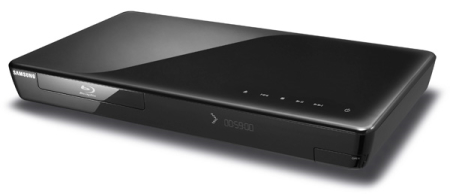
Very good choice for any entertainment system!
Overall
Summary
Great for playing Blu-Ray, DVD’s and Netflix. Upgrades could be faster.
Pros
Lots useful of features, excellent quality and wireless.
Cons
Wireless setup is not clear, upgrades take forever and price was too high when I bought it.
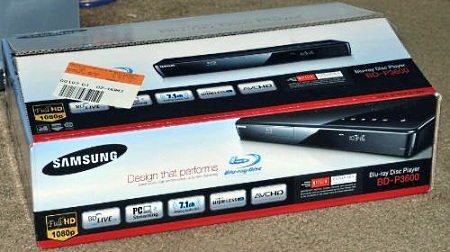
I bought this Samsung BD-P3600 Blu-Ray player because I wanted to stream movies and TV shows from my Netflix account. It was a little expensive but I couldn’t wait any longer to get it. This is my first Blu-Ray player and also my first Netflix player.
I bought Samsung because I already own a Samsung LN-T1953H 19 inch LCD HDTV, the ease of use of all Samsung products, and the sleek look of this unit. I paid about $350 plus tax when I first purchased this in early 2009. So I have used this unit for a while and have a lot of experience with it. I have done many upgrades to the software and also use the Netflix service on it as well. So let’s see what it’s all about.
LOOK AND FEEL
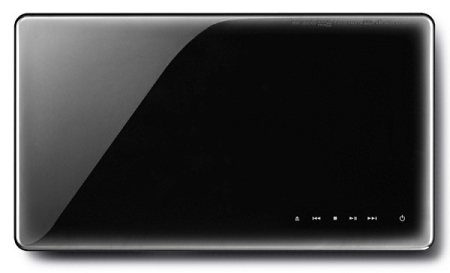
The BD-P3600 was designed as a set-top box while one model up, the BD-P4600 was designed as a wall mount unit. While the BD-P4600 is smaller and more compact, the BD-P3600 is not less as it also has a high-glossy and stylish design that will only compliment your entertainment center (frankly, it looks cool). This BD-P3600 is slim and shiny at the same time and that means it’s a magnet for fingerprints and dust. That’s not big deal because you will be using the universal remote anyways, so the touching will be at the minimum.
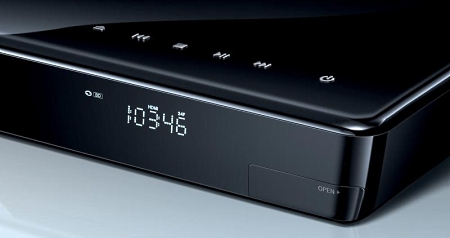
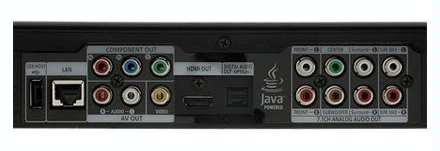
There are touch-sensitive controls (that’s right, there are no actual buttons on this unit) on the top for power, eject, and playback control. Just below the controls on the lower right, there is a little door that hides the USB port. The back has an array of different output ports such as the HDMI, Component, Composite, SPDIF, Ethernet (RJ-45), another USB (4 pin USB Type A), and 7.1 channel line-out. Wired connect can be a pain if your router is in a different room or even a few feet away from the player. But not to worry, you get a Wireless adapter that you can plug into the USB port on the front (if the signal strength is not so good) or back (preferred to keep it out of the way).
FEATURES
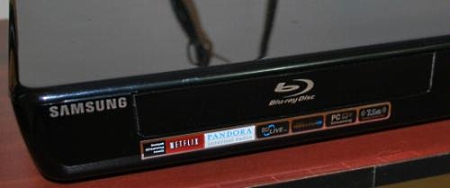
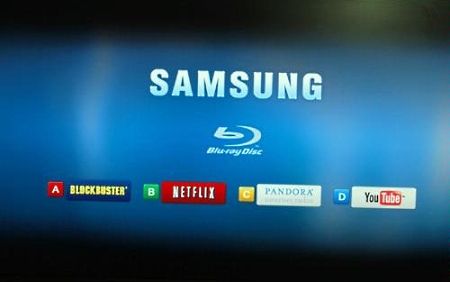
Included in the package is an equally stylish remote control that has most of the buttons where they make the most sense, but some of the buttons are all the way at the bottom–like the Disc Menu, Title Menu, and Popup Menu. The buttons for Netflix, Blockbuster, YouTube, and Pandora are actually soft (generic color-coded–Red/Green/Yellow/Blue) buttons–no easy access buttons here.
The user interface (main menu) is very easy on the eyes with vibrant and crisp colors. The vertical menus are easy to navigate through to get to what you want. Now, Netflix, Blockbuster, YouTube, and Pandora have better interfaces that allow you to find your movies, clips, or stations quickly and easily. With Netflix, your instant queue items are arranged horizontally on the screen that you can easily scroll through and play. The only down-side is that you cannot search and add new items to your queue from the interface (you will have to use your computer to do that). Pandora’s interface is not so good looking but it provides full access and is easy to use. With the Blockbuster interface, however, you do not need a computer to access movie titles. As for YouTube, it is also not so easy to use. If you have playlists or favorites than you do not have to do much, but if you just want to search and play then good luck typing and playing. It does take a while to type on the remote as you can imagine (it does NOT have a full keyboard).
This unit supports Profile 2.0 for Blu-Ray, like most other players in the market today, so you can play BD-Live features on some Blu-Ray movies (I haven’t tried it as I don’t rent Blu-Ray discs since they cost more–I will just stick to DVD’s for now). There is also a 1GB of onboard memory that you can use to download BD-Live content (no need for an external USB drive).
This BD-P3600 is also capable of streaming media directly from a connected PC on your network. It is compatible with MP3, JPEG, and DivX formats. This is all in theory as I have yet to get this feature to successfully work with my network environment at home. Maybe recent upgrades would make this function to actually work and the setup to be easier. There is also an online update/upgrade feature on this unit that will actually update the firmware directly from Samsung. While I like the idea, the upgrades do take what seems to be an eternity. The very first time I checked for updates, it said there were no updates available even when Samsung’s website had an update. So I had to download and copy it to a USB flash drive for my very first update. After that, Samsung seems to have fixed that issue with the updates not working. I cannot stress this enough, but online updates take forever, and ever, so have other plans to keep yourself busy while the update runs.
INSTALLATION
Setting up this player is a breeze–just unpack, plug in the power, plug in the HDMI (or your choice of output) and you are ready to go with watching Blu-Ray discs on this unit. To connect to Netflix, Blockbuster, YouTube, or Pandora, you will need to have a wired or wireless network connection. Wired connection is pretty simple as you can imagine (just plug in the Ethernet cable from your router to the back of this player), but wireless is one big battle on its own. The instruction tells you to search for the wireless and enter your password to connect, but what it doesn’t tell you is that if the SSID (Service Set Identifier or Network Name) of your wireless network has a space in it, you are in for a very bumpy ride. All the other options are easy to find and are exactly where you would expect them to be.
The rear panel provides a generous collection on output ports where the main connection is the HDMI output that can handle 1080p HD video and multichannel audio all in one single cable. The Component-video connection can output video at 1080i and DVDs at 480p. There is an optical digital audio output and also a 7.1 analog audio output, so you can pretty much connect this player to any receiver to the TV. There is also a USB port that you can use to plug in the wireless network dongle or a USB flash drive (which is really not needed). There is also another in the front that I hardly ever use. There is also an Ethernet port that you can use for a wired network connection, but that’s so last century.
EXPERIENCE
I am a big Netflix fan so I will stick to it. I usually add new movies to my instant queue (new meaning newly added to the instant category not new as in just released) while I browse the web or as I have time. At any given point in time, I have anywhere from 40 to 80 titles in my instant queue. I can easily watch what I want quickly from the list or if I have an issue, all I have to do is move that title to the top of the list so it shows up first. The quality of the streaming video from Netflix is very good compared to that when you watch it on your computer.
I hardly ever use Pandora as I don’t like the music on there (I would rather listen to my own personal MP3 collection or my iPod). I do play clips from YouTube that I have saved to my playlist (usually music videos) and they play fine without any issues. The quality is decent but not as good at Netflix.
Besides watching movies from Netflix and YouTube, I also watch actual DVD’s and sometimes Blu-Ray’s. I did try Blu-Ray discs at first when I got this unit but I am not that big of a quality freak so I switched back to DVD’s which provides excellent quality (as far as I am concerned anyway). I can really live without the extra features Blu-Ray discs provide also until the prices go down. Blu-Ray quality was excellent when combined with my Samsung HDTV and DVD movie quality is exceptionally similar.
I have also played AVCHD DVDs on this unit that I created at home with the clips I recorded using my Sony Handycam HDR-XR200V 120GB HD Camcorder. The quality again was excellent as it is with any high-definition content when played on this player.
I do run the online updates every now and then or when prompted to update, but I just hate it when the update takes hours and hours even though the firmware file is less than 100MB (roughly ~75MB) in size. I also have a 3.0MB/s DSL connection that downloads a firmware file from Samsung’s website in a few minutes. I think it will be quicker if you just download it and copy it to a USB flash drive then update.
FINAL THOUGHTS
This Samsung BD-P3600 Blu-Ray Player has a quick load time for DVD’s but takes a little tiny bit longer for Blu-Ray movies. The wireless network setup was my biggest complaint, but once I figured that out, it was smooth sailing. There are a lot of features on this BD-P3600 that will keep you entertained for hours with the high-quality picture, wireless connectivity, fast performance, and ease of use. The price I paid is history now, so you can get this Blu-Ray play for around $200 (which is a bargain). It is a great buy for the money I paid for it and for the money you will pay now for it. I would highly recommend this to anyone who is looking for a high-end Blu-Ray player with a plethora of features to go crazy about. I give it 4 out of 5 because the wireless setup was not so easy and updates take forever. Overall I am very pleased with this purchase and would not hesitate to purchase another Samsung if the need arises.