
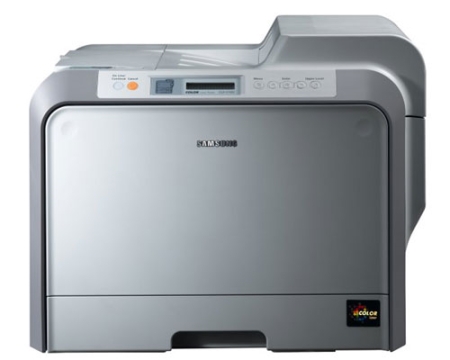
Nice laser printer!
Overall
Summary
A great laser printer for your office with a low price tag.
Pros
Fast, does color, and reliable…
Cons
Quality is not so great…
In November of last year that ended just two days ago, our corporate office decided to acquire two laser printers and as expected, I was assigned the job of finding the best ones for the best price.
After reading lots of reviews and price comparisons, I decided to recommend this Samsung CLP-510 laser printer for the job. This was the first time I had ever recommend a Samsung printer; I just wanted to see if they were better than the HP and Canon laser printers. This time we did not purchase these printers from a retail store, instead we decided to go online and find the best deals. We went to superwarehouse.com and got a good deal on these for about $369.99.
INSTALLATION
The setup process was simple enough since I followed the steps in the quick setup guide; after all, it was the first time I was setting up Samsung printers. It took me less than forty-five minutes to unpack and completely set up the units; again because this was the first time with this brand. The software and driver installation were fairly quick compared to some other manufacturers who make installing drivers pain and time-consuming. But the wait also pays off, and in this case, the performance and quality are very good. I had these printers connected and running in about thirty minutes.
INSTRUCTION MANUAL
The user manual is very simple to read and comprehend; everything is easy to find. The girls at the corporate office are not computer scientists, but with a little help from the user manual, they can now operating this machine even with their eyes closed. Samsung has always done a great job in writing its user manuals, for all its products.
DESIGN AND CONTROLS
First of all, I personally do not like the looks of these two printers; I think they are very ugly. They are not gray and black like most other printers; instead, they are gray and white. I think it is the white that makes it ugly. Anyways, this laser printer is about 20.1 inches wide, 15.9 inches high, and 18.5 inches in depth. And it weighs a whopping 70.5 pounds so once you set it, you just have to forget about moving it again. We really do not care about the weight because they are just going to sit on a desk and print. The girl at the office there is definitely not strong enough to lift this so every time they need to move of lift this, they call me or some other guys from the shop.
There are not many buttons on the control panel so you will not have to look at the manual to work with this machine. Once it is all set up, you can just print from your computer with just a few clicks. But the best way to find out what each button does and how to use them is by reading the user manual (thoroughly) which will provide a lot of information with details on how to operate this unit. Even though I think these printers are ugly, they are not that ugly.
SPEED AND MEMORY
This laser printer prints about 25 pages per minute of single-sided blacks, and about 6 pages every minute for single-sided color prints. It can print about 11.5 pages per minute of duplex prints (double-sided) and up to 6 pages per minute for double-sided color prints. It has a total of 64 MB memory which can easily be upgraded to 192 MB as an option. This should take care of your regular printing needs, but if you are going to do a lot of complex printing then you may need to upgrade the RAM.
WARRANTY INFORMATION
Samsung provides one-year limited hardware. You can visit samsung.com or dial 1-800-726-7864 (-800-SAMSUNG) to get warranty support. You may be asked for the serial and model numbers of the unit, which can easily be found by following instructions in the manual.
TONER
These laser printers are compatible with many different toner cartridges. Here is a list of these cartridges and how they are helpful (gathered from samsung.com):
- Cyan CLP-510D2C (cost: $73) (Yield: 2000 pages)
- This print cartridge offers great print quality and reliable performance for affordable, professional-quality color printing; it also has new advanced toner, ease-for-use features, and smart technology.
- Cyan CLP-510D5C (cost: $120) (Yield: 5000 pages)
- This print cartridge offers great print quality and reliable performance for affordable, professional-quality color printing; it also has new advanced toner, ease-for-use features, and smart technology. And high-capacity toner decreases cost per print and increases up-time.
- Magenta CLP-510D2M (cost: $73) (Yield: 2000 pages)
- This print cartridge offers great print quality and reliable performance for affordable, professional-quality color printing; it also has new advanced toner, ease-for-use features, and smart technology.
- Magenta CLP-510D5M (cost: $120) (Yield: 5000 pages)
- This print cartridge offers great print quality and reliable performance for affordable, professional-quality color printing; it also has new advanced toner, ease-for-use features, and smart technology. And high-capacity toner decreases cost per print and increases up-time.
- Yellow CLP-510D2Y (cost: $73) (Yield: 2000 pages)
- This print cartridge offers great print quality and reliable performance for affordable, professional-quality color printing; it also has new advanced toner, ease-for-use features, and smart technology.
- Yellow CLP-510D5Y (cost: $120) (Yield: 5000 pages)
- This print cartridge offers great print quality and reliable performance for affordable, professional-quality color printing; it also has new advanced toner, ease-for-use features, and smart technology.
- Black CLP-510D3K (cost: $73) (Yield: 3000 pages)
- This print cartridge offers great print quality and reliable performance for affordable, professional-quality color printing; it also has new advanced toner, ease-for-use features, and smart technology.
- Black CLP-510D7K (cost: $100) (Yield: 7000 pages)
- This print cartridge offers great print quality and reliable performance for affordable, professional-quality color printing; it also has new advanced toner, ease-for-use features, and smart technology. And high-capacity toner decreases cost per print and increases up-time.
All of the toner cartridges are easy to install and/or replace; all you have to do it open the cover, unlock the cartridge which allows you to remove and replace the cartridge, and replace them. These cartridges may cost you more from most retailers but if you visit costco.com you will notice that the prices are much lower.
QUALITY
We have been printing invoices, letters, memos, expense reports, some minor graphics (color), and more with these printers and the quality is exceptional. Every single print we made (whether it is text, text with graphics, or just photos) turned out to be of good quality. I am not saying that it provides excellent print quality but it is good enough for our needs.
Text Prints
All the text prints we made are exceptional and good for all our needs. We do not need the highest possible quality, but we do need one that prints quickly. The text print quality could have been much better for a laser printer though.
Graphics and Text Prints
Whenever we print graphics and text together (like a web page or driving directions), we just select what we want to print and let the printer handle the rest. At default settings, the prints are fairly clear and easy to read. But sometimes I wish it to be better.
Photo Prints
I print a picture or two just for testing purposes on regular paper and the quality is okay, but not great. This printer is not made for photo printing, but you can do minor color prints pretty well.
PROTECTING YOUR INVESTMENT
The manual suggests some useful tips on how to maintain this printer and at a shop like ours, you know it will get dirty and messy. So do perform a cleanup every now and then.
Maintaining as per the manual
The manual shows you exactly how to clean and have it performing at its best all the time. It also shows how to check the ink level and perform self-tests. It has very helpful tips on how to handle/clean/dispose of ink cartridges (new or used) properly. I suggest recycling all your ink cartridges so you can save more money in your future ink purchases.
I have up close and personal experiences with many different kinds of printers and I know that dust does tend to collect over time, so it is always best for the printer and its performance that you clean the exterior and the interior at least once a month (maybe use some kind of compressed air blower to blow the dust away then wipe it with a dry piece of cloth or paper).
EXPERIENCES
For the one something months, we used these printers we never had paper jams or trouble printing. Everything works fine it is just the quality that I do not like. Although, the employees at the corporate office have not complained about it yet; it is just my opinion because I am not used to that kind of quality. Other than that these printers are great for your office or home office. If you do lots of black printing than this printer will work great for you. Color prints, on the other hand, are not so great in quality or speed.
FINAL THOUGHTS
It has been about two months since we got these two printers and I have not received any complaints about the printer from the corporate office. This probably means that everything is fine and they do not have any problems with it yet. I am sure this printer will last us for years and will keep providing us with a lot of prints. The toner cartridges are somewhat on the expensive side but they provide lots of prints.