
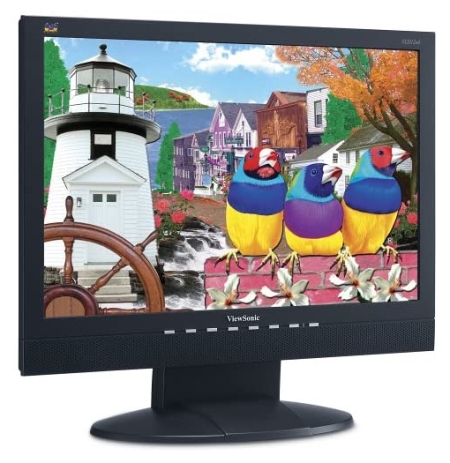
Perfect for any office or cube!
Overall
Summary
One of the biggest and lightest LCD monitors with the best quality available today.
Pros
Huge display screen, very light-weight, and great picture quality, and built-in speakers…
Cons
None at all!
After so many years of using the big, bulky, and heavy CRT (cathode-ray tube) display monitors for my home computers, I finally treated myself with this brand new ViewSonic VA2012WB 20.1” (20” viewable) Widescreen LCD (liquid crystal display) monitor.
The retail price for this LCD is about $450 plus tax, but I got is on sale at Costco Wholesale for $350 plus tax. I think I got a good deal, but some people would say that you can get a better deal if you purchase online. I do not like purchasing such big and high priced items online because of the high shipping cost and the risk of damage during shipping. I have had my eye on this monitor for some months now and I finally convinced my wife that I really needed this monitor to save space on my desk. But I purchased this monitor when my wife was at work so she only saw it the day after. So I was safe… for a little while anyway.
DESIGN
There are a couple of reasons I purchased this particular monitor; one is the huge 20.1” (20” viewable) size and the other is the fact that it is a widescreen monitor. The maximum resolution for this monitor is 1680 x 1050 at 60 Hz. The contrast ratio is 600:1; it is brighter than any CRT monitor I have ever used. This can be a good or a bad thing; if you like it bright then you are in luck, if you like it dim then you are in luck also as you can turn the contrast and brightness down a lot. This high-resolution monitor also has a 16:10 wide aspect ratio; meaning it can display a lot more information than regular high-resolution LCD monitors. The screen is wider so you can see more simultaneously.
This particular unit has a black front panel and a black rear panel. I chose black because I have a silver/gray PC case (Kingwin Inc. Mutant X) and an all-black keyboard and mouse (Microsoft Desktop Pro) set, so everything matches perfectly. I lot of my relatives say I have a very attractive setup.
The control buttons on the underside of the front panel will take a little while to get used to as they are a bit different they regular CRT display controls. This monitor also has built-in stereo speakers so you have three volume control buttons (mute, increase & decrease) for that. There is a 1 button, up and down arrow buttons, a 2 button, and the power button on the panel. The 1 button acts as a Menu button and the 2 button is the cancel button. If you set your screen resolution to 1680 x 1050, you should have no problems viewing anything on the screen. There is a little green LED light next to the power button that indicates if the monitor is on or off.
RESOLUTION
The maximum resolution this monitor can support is 1680 x 1050 at 60 Hz, and that is also the recommended optimal resolution for this monitor. Mine is set to this setting and I have no problems with flickering or anything. I have an EVGA GeForce 7800 GT 256 MB video card to go with this monitor. I must say that the video card and this monitor work even better together than my old Gateway EV 910 19” CRT monitor.
DIMENSION AND WEIGHT
This monitor weighs only about 12.1 pounds when it is out of the packaging. I am glad I got rid of the bulky and heavy CRT monitors from my desks at home. Now I will not break my back when I lift it now and then to clean my desk. This monitor is 18.8 inches wide, 16.7 inches high, and 8.5 inches in depth without the packaging. Basically all I can say about the size is that it is big, but light. Oh yeah, there is a base that holds the monitor upright, but it can also be mounted on the wall or one of those swivel things that you can install on the wall.
QUALITY
The Dot Pitch for this monitor is 0.294 (mm). So far I have watched movies, looked at my digital pictures, edited my photos and home movies, played high resource-demanding games, and browsed the internet with this monitor, and I have not ever had a hard time seeing what I was seeing. The image quality is bright and excellent which is never extra blurry or extra sharp; it is always just right. At night with no lights on in the room, I have to reduce the brightness and contrast to make my eyes comfortable, and during the day or when the lights are on, you can turn them both all the way up and you will have no problem what so ever. If you are like me and are switching from a CRT monitor then you will notice the improvements in quality, contrast, and brightness. If you are upgrading from another LCD monitor then you will just be happy with the improved display quality of this monitor.
VIEWING ANGLE
The panel type for this monitor is 8 ms TN (CPT), which means it will be great for gaming because it has very minimum ghosting, but it will have poor viewing angles when compared to other brands and models. It also has a 6-bit panel (16.2 million colors), which may not be all that great for professional graphics work. I am not a professional graphic lunatic so I do not care about it that much. The poor viewing angle does not bother me at all because I do not view it from angles other than straight forward. I have not had any glare problems so far because I have set the contrast and brightness to my comfort level and I have had no need to change it. So just find your comfort settings and you will be all set to go without any problems.
THE INSTALLATION
This LCD has an analog 15-pin mini D-sub connector and a digital DVI-D connector on the back; it also has an audio input as it has built-in speakers. There is also the 3-pin AC plug to power up your monitor. This monitor came with all the cables that you will need (a DVI cable, an audio cable, a power cable, and a regular VGA cable). Installing this monitor was very simple; just unpack it from the box, insert the screen into the base, plug in the appropriate cables and you will be up and running in no time. If you are running Windows XP you will not need any drivers; in fact, you may not need drivers even if you do not. One thing I wish this monitor came with was software that would control the contrast, brightness, size, and all without needed to use the buttons on the front panel (the Samsung’s have software like that).
WARRANTY INFORMATION
ViewSonic provides a three (3) year limited warranty for all parts, labor, and back-light for this monitor. For information on obtaining warranty service, visit viewsonic.com or call your ViewSonic dealer or ViewSonic support. ViewSonic’s Customer Support telephone numbers are 1-800-888-8583 in the U.S. or 1-866-262-1967 in Canada. From outside the U.S.: 909-444-8800.
EXPERIENCE
It has been about three weeks now since I got these monitors for my home and it has made my daily work much clearer and sharper. I do a lot of websites and digital photo editing so this monitor really comes in handy. My older CRT monitors used to get a blurry text when I was on the internet or when I zoom in and out. This monitor saved a lot of room on my desk so now I room for the stuff I really need, like a picture of my lovely wife. I have never had a problem with the monitor heating up as the CRT’s do. What I would have liked even more about this monitor is if it only had the MagicBright (like in the Samsung monitors) button to switch from bright to dim with just a few presses.
FINAL THOUGHTS
This new LCD monitor is a high quality, high resolution, widescreen, and 20 inches and you will never be disappointed with the quality and capability of it. One thing I have come to know from personal experience is that brand names like Viewsonic, Samsung, and Sony will never disappoint you with their products. I have used all three of these for a long time now and will recommend them to anyone who wants a reliable and long-lasting monitor for either their home or office. Plus, now is the best time to switch to widescreen LCD monitors because you want to be ready for the future.