
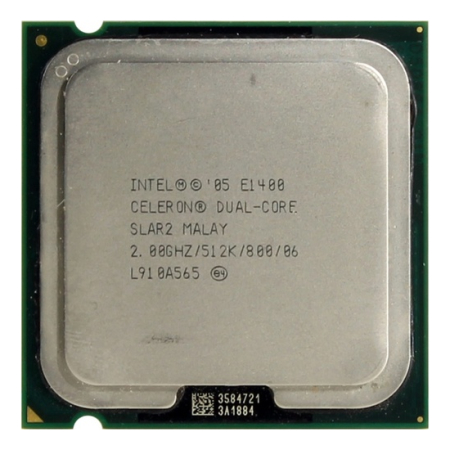
Not Intended for Gaming!
Overall
Summary
The Intel Celeron Dual Core E1400 is faster than the Celeron 356 on a Socket 775 motherboard but only by a small factor.
Pros
Dual cores offer an attractive alternative to the Intel E8600.
Cons
Poor benchmark scores, 65nm die increases heat output.
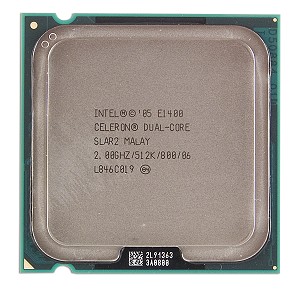
Scrapping the bottom of Intel’s processor line, we discover the E1400 2.0 GHz Dual Core product. Looking at the E1400 specifications can be quite confusing since it seems that the dual cores all you really need to run Windows 7 Ultimate x64.
As a hands-on type of computer user, you shop around for the best price for the CPU in your motherboard. The reason we do this is because we understand that PCI-e video card performance is not very dependent on the speed of your CPU. The EVGA GeForce GTX 580 1536 MB GDDR5 PCI-Express 2.0 Graphics Card will work just fine with an Intel E1400 microprocessor but before you try it out, this review will help you predict the effect that this ultra-slow CPU will have on your DC Universe Online 3D gaming.
In this review, I will provide you with all the detailed statistics and performance specifications that will change your line of thinking about the Intel E1400 dual-core processor. If you want to save time then jump to the summary section of this review to find a recommendation for another Intel processor that falls within your tax refund budget but also has enough speed to make you the leader of any online gaming community!
CONROE MICRO ARCHITECTURE
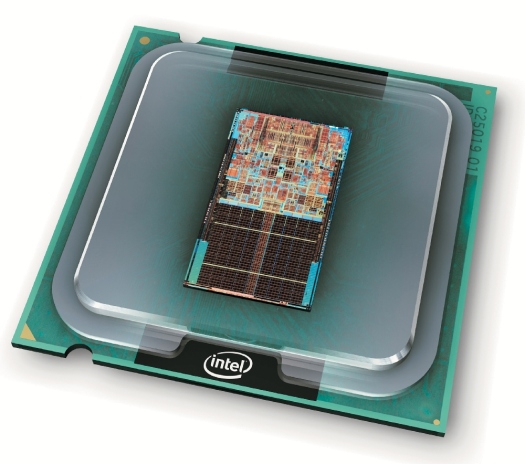
The Intel Socket 775 uses two distinct micro architecture families: Pentium and Core 2. The Conroe core was the first Intel Core 2 Duo branded processor ever offered to the desktop computer market. The Conroe is a replacement for the Pentium D and Pentium 4 branded CPU’s that were as much as 40% slower than their new counterparts. The first generation, the Conroe, was produced using a 65nm manufacturing process. While still largely unknown, many of these processors had half or all of their L2 cache disabled. With the Intel Celeron E1400, we have a processor that has almost all of its L2 cache disabled and a front-side bus (FSB) of 800 MHz. L2 Cache prevents the processor from having to frequently request information from your DDR2 RAM. Since the FSB of the Intel E1400 is just 800 MHz, your computer will be bottle-necked with slow memory access speeds. As a saving grace to these architecture limitations, the Conroe core does offer 40% less power consumption when compared to the scorching disaster, the Intel Pentium D.
For years, we have been told that cache is critical to unlocking the true performance of any desktop computer. The Intel 386 was quickly offset by the larger cache on the Intel 486 (and an FPU helped too). Now, we see Intel pushing out low-level Celeron products that only have a total of 512 Kb of cache beyond Level 1. Gaming and intense number-crunching applications like SETI@Home or other BOINC projects will not perform well on this processor. Yet, this is also why the processor can be found so cheaply at many online retailers like Amazon.com and on eBay.com. The processor still manages to hold its own in benchmarks because it makes up for the lack of cache with its two physical CPU cores. As you will see later in this review, the lack of Level 3 cache on this Intel product and dual cores have some significant advantages to the extreme computer system builder.
OVERCLOCKING AND PERFORMANCE TESTING
The Intel Celeron E1400 Socket 775 Processor will overclock quite well to 2.6 GHz on a stock cooler with Arctic Silver heat-sink compound applied to the die surface. For the testing portion of this review, I used an Asus P5QL-VM DO/CSM LGA775 motherboard, Crucial Ballistix Tracer 4 GB (1 GB x 4) DDR2 1066 all running under Windows 7 Ultimate 64bit edition. I was able to overclock the Celeron to 2.6 GHz using the stock air cooler and was even able to get the BIOS to post with 3.0 GHz. The problem came with loading Windows 7 Ultimate 64bit. The computer would freeze after just a few minutes at 2.8 GHz. I am hoping that a Scythe SCMN-1100 MINE Rev.B 3 Heat Pipes CPU Cooler will be able to get the Celeron processor stable at 3.0 GHz.
Super Pi
Super Pi V1.1 is an application that extrapolates the specified digits of PI into a text file. Since the task is both processor and file system intensive it can give you an idea of how fast your CPU is. Processors with large on-die cache sizes and high bus speeds tend to do better in this benchmark. The problem is the calculation is single-threaded in this version so you only see the performance of one processor with this version of the benchmarking suite.
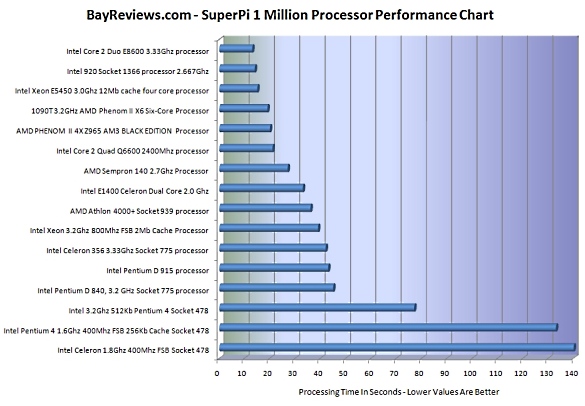
In this test, I analyzed the performance using the 1,000,000 digits of Pi calculation. I overclocked the Intel E1400 to different frequencies and ran the test 3 times and reported the shortest time returned in the list below. As a cross-reference, I also provided the benchmark results from other processors that I tested in the past few years in order of seconds that they took to complete.
| Clock Speed | Type | Test Results |
|---|---|---|
| 2.0 GHz | Stock | 33 seconds |
| 2.2 GHz | Overclocked | 33 seconds |
| 2.4 GHz | Overclocked | 27 seconds |
| 2.6 GHz | Overclocked | 26 seconds |
The most important aspect of this lengthy list of statistics is to note that this Conroe based processor scales quite well will an increase in clock speed. As a result, we can conclude that the main reason for this is the faster FSB frequency which allows it to make more memory cells. With the Socket 775 CPU interface, you want a processor with more L2 cache, not necessarily a higher clock speed but a smaller die size. To hint at the true potential of these motherboards, do not forget about the Intel Q9650 which runs four cores at 1333 MHz FSB in a 45nm die package and boasts an amazing 12 Mb of L2 set-associative cache.
Here is a chart of how the Intel E1400 Dual Core stacks up against the competition in Super Pi:
POV-Ray 3.7 RC2 64-Bit
A new version of the freeware 3D animation utility has been released that offers SSE2 enhanced processing extensions. POV-Ray stresses the floating-point unit and memory bandwidth of the processor to render stunning 2D images. The raytracing software package also makes use of all available logical CPU cores in your computer system to render images. For this reason, POV is my processor benchmarking package of choice!
For this test, I am using the benchmark.pov file with QuickRes.ini value of 512 x 384 NO AA since it is provided with all new installations of POV. I am also following the results of the Intel E1400 processor with those from other reviews that I have written to give you a comparison by which to judge the performance.
| Clock Speed | Type | Test Results |
|---|---|---|
| 2.0 GHz | Stock | 5 minutes 51 seconds |
| 2.4 GHz | Overclocked | 4 minutes 46 seconds |
| 2.6 GHz | Overclocked | 4 minutes 16 seconds |
For a quick comparison, take at look at what these AMD processors can do with the same benchmark.
| CPU | Clock Speed | Test Results |
|---|---|---|
| AMD Sempron 140 | 2.7 GHz | 13 minutes 11 seconds |
| AMD 1090T Phenom II X6 Six-Core Processor | 3.2 GHz | 3 minutes 53 seconds |
THERMAL CHARACTERISTICS AND UNDERCLOCKING
Another option that the low power Intel Celeron E1400 gives us is the ability to under-clock and create a computer system that can survive high temperatures outdoors. While this may not seem like a practical option for the computer system builder, you will become a fan once you realize that you can install a computer in your attic with surveillance video cameras to record footage of your home while away. Low power and low heat processors ensure your system is stable and easy to manage without costly investment. Wireless networking combined with Windows 7 Ultimate will allow you to remotely log into the computer from anywhere in the world to see if any events have occurred. I used an ASUS P5QL-VM DO/CSM LGA775 motherboard for this low power system build and in the BIOS set the processor multiplier for the Intel E1400 to 6 to get an effective clock rate of 1.2 GHz across the dual cores.
In the following graph, you will see how the Celeron E1400 performs when overclocked using an Evercool HPH 9525E heat-sink. You will notice a strong spike in temperature at around 20C which indicates that this processor is not going to remain stable at room temperature. You will need to put a hefty Thermaltake V6 GT cooler on the E1400 if you want to break the 2.6 GHz barrier on air cooling alone.
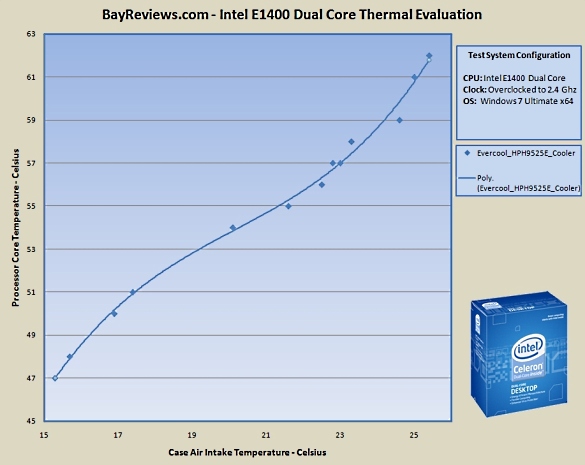
Underclocked Performance of E1400 Conroe at 1200 MHz
In Super Pi, 1 million benchmarks the Intel E1400 at 1.2 GHz completed the test in 51 seconds. At 1200 MHz the processor completed the POV-Ray benchmark in 9 minutes 35 seconds. With the dual cores fully loaded for over 30 minutes, the processor only reached a CPU core temperature of 43 degrees Centigrade. At 2.0 GHz and fully loaded, the Intel E1400 CPU processor temperature 58 degrees Centigrade. Lowering the clock speed of the E1400 Socket 775 processor drastically reduced its peak temperature and since it is the only one of the line without any significant amount of cache it is also likely the coolest. Even at this reduced clock speed, I was still able to watch video playback on my Asus 1005HA netbook when logged in remotely so the operation of the computer did not seem to be compromised by any significant amount for my purposes of video surveillance.
To be completely honest, underclocking a dual-core Celeron processor for use as a surveillance system was the only use that I could find for this Intel product. You may be able to build a decent web browsing machine with it but in an office situation, you will need the faster number-crunching speed of the Intel Q9650 when working with Excel Spreadsheets. So far, the computer has remained stable for over 25 days up in my attic. For safety considerations, I have the machine powered by a 300-watt power supply and it has air filters on all case intake vents.
MOTHERBOARD COMPATIBILITY
The Intel Celeron E1400 Socket 775 processor is compatible with a wide range of motherboards due to its relatively low power draw and 800 MHz front-side bus. You can also use lower speed DDR2 memory sticks so you can purchase the dense 2 GB memory sticks along with a reliable Asus LGA 775 motherboard and save a lot of money compared to other buying options that require higher speed parts that cost much more.
FINAL THOUGHTS
In conclusion, the only positive benefit that you will receive by purchasing an Intel E1400 processor is the use of dual cores. The 65nm die runs hot compared to 45nm or even 32nm products and it does not overclock very well either. I did purchase this processor for use as a video surveillance station in my attic. For this purpose of dedicated number-crunching in a high heat environment the Socket 775 processor seems to have found its home. I gave the Intel Celeron E1400 Conroe two stars for its two cores. If you are really looking for an economical Intel Socket 775 processor then I suggest looking at the Intel E3400 dual-core. E3400 comes with a much larger L2 Cache and smaller 45nm die to increase your ability to overclock the processor.