
Great power and great affordability!
Overall
Summary
A great processor for a great price!
Pros
Quick, reliable, inexpensive, and 64-bit compatible.
Cons
None that I found.
The first week of December was a very busy week for me and one of my clients came to me for upgrade work. He wanted his processor to be upgraded from an old AMD Athlon XP 2500+.
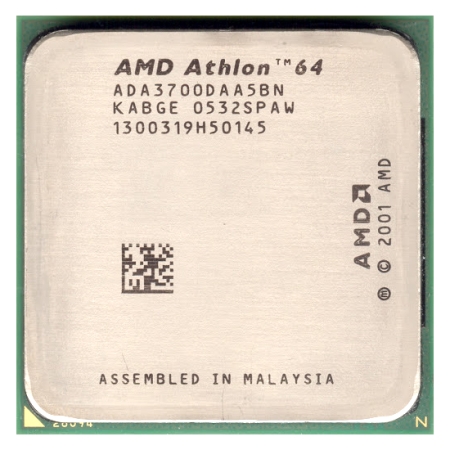
So I went online to newegg.com purchased this AMD Athlon 64 3700+ processor as he had a budget of $500 and I still had to buy the mother board. I chose the Asus A8V Deluxe motherboard for this job. By using this combination I was also saving some money for my client which he was very pleased about.
INSTALLATION
This AMD processor installation was really easy for me anyways as I have built a lot of computers and have lots of experience with them. Plus, these processors are really simple to install and if you get stuck you can simply follow the instructions in the quick install guide. The easy installation guide comes in handy if you are doing this for the first time, even the second time (you get used to it after that), or if you just want to refresh your memory. You should not encounter any problems if you use the stock heat-sink and fan, but if you do plan on using different ones than use the instruction that came with the fan and heat-sink to install it properly.
If you choose to install the stock heat-sink and fan (like my client), I would highly advise against overclocking this processor (plus it is already pretty fast). One thing I would like to suggest to you if you are planning to install it yourself is to always use Arctic Silver thermal grease when installing the heat-sink; it will help keep your processor cooler or make it cooler faster and run cooler at all times. Heat-sinks tend to get dust and dirt stuck on them over time, so I suggest doing a clean up every three months or so. I had not cleaned mine for about six months and the processor started overheating; when I opened it up I noticed a lot of dust and dirt on the heat-sink. Now it runs much cooler after a good cleanup.
The first time you boot-up your newly built or upgraded computer with this processor, you may need to clear your CMOS/BIOS settings to factory defaults to make sure you start out with a clean system (this will reduce the chance of crashes and conflicts). You may not have to do this if you are just replacing or upgrading your processor. Then you have to install your favorite operating system or if you already have an operating system installed, just boot up. One thing to keep in mind when booting for the first time is to keep an eye on the processor and memory (RAM) temperatures especially if you used a different heat-sink and overclocked the CPU. I also suggest that you make sure the memory sticks you have are compatible and can overclock without problems.
WHAT’S HOT?
The rated speed for this processor is 2.4 GHz and that is the main reason my client and I purchased this processor. If you compare this processor to its competitor Intel, you may think that it is slower, but when you use it, you will notice huge differences in overall performance and power. I would recommend all AMD processors overall Intel just because they are easy to overclock, install, use, and maintain. Windows (or other) operating system(s) will boot up faster and your applications will start up quicker, so you have a much more stable computing experience. Although my 4400 is way faster than this, I did notice that this processor is not too far away from it. If you cannot afford the Athlon 64 4000+ or the X2 4400, this processor would be one of your other choices.
A lot of my clients ask me if the 64-bit processors are really better than the older 32-bit ones and I always ensure them it will be the right way to go. Once they try it for their selves, they know right then that I steered them in the right direction with AMD’s 64-bit processors. If the client does not mind paying a bit more for the upgrade I would highly recommend the newer dual-core (X2) processors that I just got a few weeks ago; these are way faster than the single-core processors.
These processors use the 939 pin design like most of AMD’s 64-bit line of processors. The 1024 KB L2 cache memory will run the 2000 MHz of FSB without any problems. If you get a motherboard that will speed up your DDR memory, it will just add to the performance and power of your new or upgraded system. You will be able to run almost anything many times faster than before.
AND WHAT’S NOT?
In my opinion, a review is not complete without the cons or not so hot part of the product. But for this product, I have not noticed problems with it or any AMD processors I have ever used or installed on my client’s computers. I have not experienced any problems or crashes as I updated all software, drivers, and games to make sure there were no problems. I do not like to take any chances with the systems I build; I do not want a return job. I would recommend that you check for driver and software at least once a month or as needed.
EXPERIENCE
Luckily I had two whole weeks to fully test this setup and it had not given me any problems what so ever. It does not overheat (my client did not want to overclock it) ever. My client said the computer is running faster than he expected. I did perform some benchmarks with 3DMark 05 and 03. I got a score of 2895 with 3DMark 05 and 8916 with 3DMark 03 (actual data). These benchmarks are accurate as of December 15th, 2005, and were performed on my client’s new system. The computer runs fast with Windows XP Pro SP2 installed on it.
FINAL THOUGHTS
The first time my client used his upgraded computer, he was amazed by the speed and power. He could not believe how quickly he was able to start up the computer and applications. My client said that I made the right choice about this processor and he has no regrets what so ever about it. The computer really does boot up quickly, the applications start-up fast, and games run smoothly (combined with the right video card). If you want an inexpensive processor that is also 64 bit compatible, then get this processor without question.