
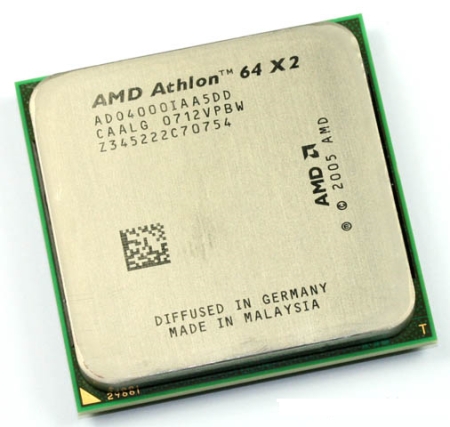
Fast and the Furious!
Overall
Summary
This processor does not know any boundaries…
Pros
Fast, overclockable, reliable, and AMD!
Cons
None that I found.
The AMD Athlon 64 4000+ processor is the smoothest and fastest processor that I can afford at this point in time. Even though I paid about a hundred dollars more to get it just two weeks before it went on sale, I am very happy with it. When I think about it, I curse myself for not being able to wait to get this process; I had been looking to buy this process for over six months and I just could not hold on any longer. I could have waited another two weeks and saved a hundred bucks, but it is all good. I will try my best to get all of the most helpful information on this review, but since it is my first about processors I may miss some information.
INSTALLATION
The installation was as easy as always when it comes to AMD processors. I purchased the Asus A8V Deluxe motherboard to go with this processor since I was upgrading from my old AMD Athlon 2500+ on an Asus A7N8X motherboard. The easy installation guide that is in the box comes in handy if you are doing this for the first time. The guide clearly guides you step-by-step on what to do to properly install your processor.
After installing the processor, you can either choose to install the stock heat sink (which is also perfectly good if you do not plan to overclock) or one of the favorites that will keep you processor cool and performing at its best. One tip I would like to give you if you are planning to install it yourself; use Arctic Silver thermal grease when installing the heat-sink.
Now when you boot-up for the first time with this processor, you would probably have to clear your CMOS to make sure you start out with a clean system. Then just install your operating system or if you already have an operating system install, just boot up. One thing to keep in mind when booting for the first time is to keep an eye on the processor temperature (especially if you used a different heat-sink and overclocked).
I had some trouble booting the first time because the memory cards I had were not compatible with the motherboard. I figured that out after about an hour of tweaking the CMOS settings. All the motherboard told me was that “System Failed Due To CPU Overclocking.” I did call Asus customer support and they said it would be the memory modules. After I installed some new memory sticks it worked fine.
FEATURES I LIKE
Two of the features I like the most are AMD’s Cool N’ Quiet and Enhanced Virus Protection technologies. The Cool N’ Quiet technology that helps to reduce noise and power consumption by the processor. It automatically throttles the processor speed along with a thermally controlled heat-sink fan(s). When the processor is not being used that much, it reduces the processor and the heat-sink fan(s) speed to reduce the amount of heat and noise this is produced by the processor and the fan(s).
Enhanced Virus Protection technology is only on AMD’s Athlon 64 processors. It is designed to prevent many viruses from infecting your computer. Enhanced Virus Protection works together with Microsoft’s Service Pack 2 for Windows XP. When enabled the operating system watches for a lot of activities that often imply a virus has infected the computer.
Other than these two newer technologies the processor supports the standard Athlon 64 features including SSE2, a 1000 MHz (up and downstream) Hypertransport link to the motherboard, integrated dual-channel memory controller, 8 extra 64-bit registers, and other very useful features.
SYSTEM SPECIFICATIONS
| CPU | AMD Athlon 64 4000+ |
| CPU Clock | 2.4GHz (normal) / 2.64GHz (Oc'd) |
| Heat-sink | ThermalTake Silent Tower |
| Graphics Card | PNY Verto GeForce 6800GT |
| RAM | 3 x Kingstone PC3200 CL2.5 512MB (1.5GB) |
| Storage | 1 x 40GB 1 x 160 GB 1 x 200GB |
| Optical Drive | 2 x Sony CD/DVD-RW |
| Power Supply | 500W ULTRA X-Connect Modular Power Supply |
| Operating System | Microsoft Windows XP Pro |
EXPERIENCE
I have had this processor for just over a month now and it has not yet given me any problems. It does not overheat (I did not overclock yet) ever. I did notice a great difference in speed from the AMD Athlon XP 2500+ that I upgraded from. This processor blows all others far far away.
I performed some benchmarks with 3DMark 03 and 3DMark 05. I got a score of 5885 and with 3DMark 05 and 12657 with 3DMark 03 (actual data). My old AMD Athlon XP 2500+ used to get around 6573 for 3DMark 03 and 1678 on 3DMark 05 (actual data). These benchmarks are accurate as of September 10th, 2005. These benchmarks were performed on my new system (see specs below).
My computer runs way faster than my 2500+ and provides me with the capability of 64-bit computing for the future. I have installed Windows XP Pro SP2, Windows XP 64-Bit Beta, and Fedora Linux on my computer and even with two Windows installations on one hard drive, this processor does not even blink. Fedora Linux runs smoothly and without any problems.
FINAL THOUGHTS
I used to have an Intel Pentium based computer (my first computer) that my data bought back in 1998. It was fast (133 MHz); at that time it was a state of the art computer. In 2003, I finally got tired of that old guy and decided it was time for me to upgrade to a much faster computer, so I built my very first system (2.2 GHz); which was the fastest in its time. Then just about a month ago, I upgraded again to 2.4 GHz (do not be fooled by the technical difference). It is only a 200 MHz upgrade technically, but when you use it, you will feel like there is a 1 GHz difference. I have noticed major speed enhancements since I upgraded. My computer boots up faster, programs startup faster, and games run smoother. And on top of that, I am ready for the future with 64-Bit capability. Are you ready for the future? My AMD Athlon XP 2500+ was fast but this AMD Athlon 64 4000+ is just furious!