
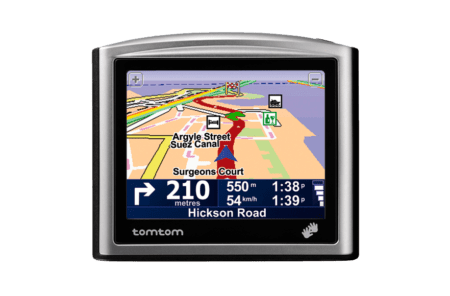
Get the ONE and NEVER get lost... again!
Overall
Summary
I think this ONE is one of the compact, simple, and accurate GPS navigation systems available today.
Pros
Compact, light-weight, fast, and highly accurate.
Cons
No text-to-speech so it cannot read street names–who needs it anyways.
It has been almost a month since my wife bought me this TomTom ONE New Edition GPS Navigation System and I only have good things to say about this. The ONE has come into existence because of the high demand recently for portable navigation systems. And all major manufacturers jumped on the idea and created their own versions of the cheaper and simpler and portable navigation systems.
TomTom ONE is the “ONE” I liked (after reading many reviews and comparing features) the most. It is our anniversary this month and we just happened to be at Fry’s electronics and I reminded my wife how much I want one of these and somehow convinced her to give that to me as my anniversary present. I know that sounds too good to be true, but it is – and there is all a catch. Yup, you guessed it; I have to get her something of the same price for our anniversary too. So let’s see if this TomTom ONE was worth the 400 dollars my wife spent on it. Oh yeah, we cannot forget Uncle Sam… he needs his share too (add 8.25% tax).
FIRST IMPRESSION
Wells, knowing me, I opened this baby up as soon as I got to my car from the store. So without any further delay, I took it out, inserted the supplied SD (secure digital) card, plugged in the car charger, and wham… it was up and running. The initial power-up will ask you a few questions to set up the unit to your preferences. So it was up and running… now what? Ah, I want it to take me somewhere. So what better destination than to test it than with your home address. That is exactly what I did. I touched on the screen and chose to Navigate to… then picked Home. Since it was the first time it wanted to set the Home address. Within seconds it calculated the route and starting giving me voice directions. I was impressed… it actually works right out of the box. Plus I was able to plot my very first route without any help from the manual or quick start guide.
I later did some reading and found out that I can choose different voices, map colors, also add live traffic information, and more. I took out the SD card and put it in my computer and turns out it only had 15MB of space left (it was a GB card). So I upgraded to a 2GB card and the TomTom Home software that comes in the package helped me Backup the information from the old card and Restore it in the new 2GB card. It took a while but now I have space in the card to actually add stuff. The Home software also helped me upgrade the Operating System (firmware) on this navigation system in just a few minutes. One thing I like about this navigation is that if you miss a turn or make a wrong turn, it will automatically re-calculate the route from your current position.
THE PACKAGE
Here are the contents of the package:
- TomTom ONE – A brand new design! Slim and elegant, it fits perfectly in your car!
- SD Card (1GB) – Containing map data.
- Windshield Holder – Lightweight and easy to mount, it matches your TomTom ONE design.
- USB Car Charger and USB cable – For in-car charging of your TomTom ONE.
- Installation CD – Contains the user manual, additional voices, and TomTom HOME software (Windows / Mac OS X 10.3 and higher) for easy content management, desktop planning, and downloads.
- Documentation
INSTALLATION
Out of the box, the only installation you have to do is to attach the suction cup to the back of the TomTom and stick the whole unit on your windshield. Then just take the charging cable and plug one end into the cigarette lighter connector of your car and the other end into your TomTom. The installation is done.
I know I made the right decision purchasing the TomTom ONE because while I was in the parking lot putting this together and getting it started, I noticed that another couple who had also just bought a navigation system (non-TomTom) trying to set it up. They got in their car at the same time as we did but when I was pulling out with mine all set up and navigating, they were still reading the manual and figuring out what to do. I had mine unpacked, installed, and working in less than 10 minutes.
THE DESIGN
Since this is the New-Edition (version 3) of the TomTom ONE, the design is different from previous versions. Believe it or not, it is only 1 inch thick. The ONE is 3.8 inches by 3.2 inches and it only ways about 6 and a half ounces. The 3.5 inches touch screen LCD is very nice and it displays maps and text bright and clear. The speaker is located on the back of the device. The SD card is inserted on the bottom of the unit right next to the USB connector for charging it. There is only one physical button on this device which is the power button and it is located on the top of the unit.
NAVIGATING
Before I go on a trip I like to save the destinations in the favorites so it will be just a fingertip away. When I get in my car, I take the ONE out of the glove compartment and mount it on the windshield. When it has powered up (usually takes about 10 to 15 seconds), I just touch the map area of the screen and choose “Navigate to…” then if the address is in my favorites I choose “Favorites” and choose the address I want. Then depending on the distance and some other factors, it takes anywhere from a couple of seconds to about 10 seconds to calculate the route. And you are on your way.
Along the way, if you want to grab something to eat, just touch the map again and choose “Point of Interest (POI)” and then choose “Near you” and then “Restaurants”. It will list all near restaurants new your location. Using this method you can find any point of interest near you, near your destination, along the route, etc…
You can also plan a route ahead of time if you have multiple destinations that you want to navigate to. First, let me explain how easy it is to save a destination to the favorites. Just touch the screen and choose “Settings” and touch the right arrow to go to the next page and select “Add to Favorites…” After that, the interface is the same as it would be when you go to enter a city, address, or POI.
It has Bluetooth 2.0 capability, but I haven’t been able to connect my Motorola Razr V3m nor my Blackberry 7130e to it. I think I still need some more reading to do. But they say it is only for TomTom Plus services like Traffic and Weather. It is strictly noted on TomTom’s website that the ONE does not feature hands-free calling.
THE PERFORMANCE
First of all, the battery life isn’t what it should be, but it is expected since it has a very bright LCD and it is in color so it uses and needs a lot of power. A fully charged battery will last anywhere from 2 and a half to 3 and a half hours for me. It takes about an hour or so to fully charge which is good. I can charge this for an hour or so in the car while in use and play my CDs instead of my iPod which has to be plugged into the cigarette lighter for the FM transmitter to work and for it to charge. But I don’t mind the trade-off there.
Route calculation is very quick (only a few seconds). Recalculation is also as quick. Navigation prompts/commands are well in advance so you don’t miss anything. Startup and shut down are quick and only take about 5 seconds (roughly).
FINAL THOUGHTS
So far I have been impressed and pleased with the performance of this TomTom ONE. I have only had one instance where it asked me to make a right turn where there was no road (there was a big wall there and a road right alongside it on the other side – maybe it couldn’t tell the difference). I don’t mind that the ONE does not say street names but it gives you all the information you need to get from point A to B without all the other BS and most other high-end GPS devices have. I mean, why would someone want to play your music from a “portable” navigation system? That is what you have iPods for. Anyways, I am giving this 5 out of 5 even after the slight misunderstanding that one time.