
Nice - Highly Recommended!
Overall
Summary
This is has the best compact design, transfer rate, and price. Highly recommended.
Pros
Fast transfers, great price, and compact size!
Cons
None at all!
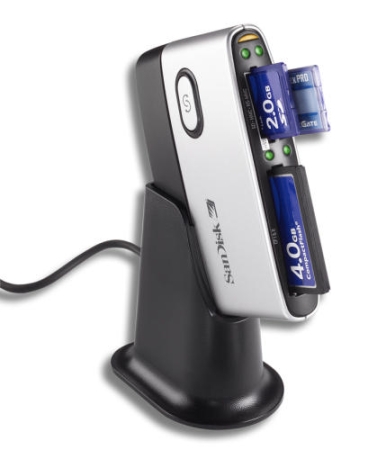
I originally had the ImageMate 6-in-1 Card Reader and Writer until I sold my Olympus C-4000 Zoom and bought an Olympus C-8080. My new camera uses the new xD card with was not in ImageMate 6-in-1. So I switched to this new SanDisk ImageMate 8-in-1 Card Reader. I would say that I am as much satisfied with it as I was with the ImageMate 6-in-1. I may write a review for the 6-in-1 later.
PROS
There are many good things about this unit. First of all, it comes with a stand that fits nicely with the body. I like to use the stand to stand it upright, but you can also use an optional USB cord and lay it on its side and not use the stand. But it is better to use the stand and not bother with getting another USB cord.
The unit installs very quickly and it is plug-and-play so you do not even have to install any drivers for it. But if you want to see some nice icons in your “My Computer,” you can use the CD that comes with it and install the drivers/software. This unit once installed and mounted, works just like any removable disk drive, so you can use this with any software you want. I would recommend using Adobe Photoshop Album software that is in the CD that comes with it.
CONS
I have not had any bad experiences with this unit or the model before this during the time I used it. I use this unit about three times a week because I like to take a lot of pictures. The only thing I don’t like about this unit is that viewing the picture while they are still in the memory card is kind of slow. The computer builds the thumbnail previews fast but it takes about 3 seconds per image. This is on my AMD Athlon 3200+ computer that I built. So the best way to look at your pictures is to first transfer them to your computer and then look at them. A tip to keep in mind is to turn off the thumbnail feature in the removable drive to make it work faster.
EXPERIENCE
Now I use this SanDisk ImageMate 8-in-1 all the time as I take a lot of pictures with my new Olympus C-8080. The transfer rate is amazing when copying larger megapixel images to my computer. It also comes with Adobe Photoshop Album 2 Starter Edition software. This gave me the opportunity to try it out and test it for myself. I think Photoshop Album is one of the best album software’s in the market today.
I have never had corrupt, damaged, or missing files while using the ImageMate 8-in-1. One other good thing is that when you insert a memory card in a slot, an auto-run window pops up and you can choose either to open as a folder or with a software program like Adobe Photoshop Album.
FINAL THOUGHTS
I like using this reader and writer and will continue to use it until there is a need to get the next 12-in-1. I have had it for over nine months now and I have had no problems with it yet. I will recommend this to anyone thinking about buying a flash memory card reader and writer.