
Lego my HP!
Overall
Summary
You cannot go wrong with HP!
Pros
Fast, reliable, thin, light weight, and powerful…
Cons
Warms up a little tiny bit, and drains battery fast when watching movies…
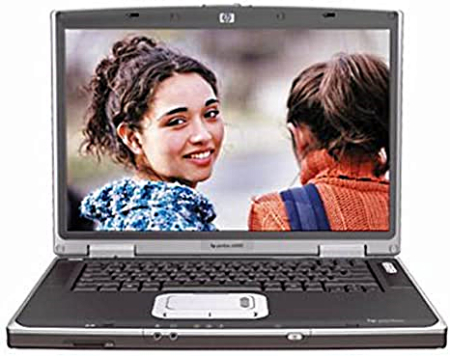
End of last year I went to BestBuy and bought this very cool laptop, the HP Compaq Pavilion ZT3280US. In the beginning, I wanted to get one of those Sony VAIO laptops but did not like what I saw there so I decided on this HP. It cost me about $2500 with tax back then, but it is well worth the money when you see the features it has at its disposal.
DESIGN
This particular laptop is much thinner and lighter than regular (older) one’s because it uses this new Mobile Centrino Technology (by Intel); it also provides longer battery life. Mobile Centrino is a processor that has wireless capabilities built-in so you will not have to purchase separate hardware (wireless internet/file transfer/etc via Bluetooth technology). Just turn on the wireless adapter by pressing an external button on the front of the laptop and you will be able to connect to the Internet wirelessly in Hot Spots (such as hotels/motels, cyber cafes, schools, or libraries).
This unit has a 15.4-inch XGA (Extended Video Graphics Array) TFT (Thin Film Transistor) LCD (Liquid Crystal Display) screen that has a maximum resolution of 1280 X 800 pixels. This LCD screen is great for watching widescreen DVD movies because it is a widescreen display (most of the movies are not widescreen). Now even though, this laptop is thinner and lighter than most other regular laptops out there, it is still not the lightest and the thinnest. I have seen some Apple and Sony laptops that are about an inch in thickness and a third in size of this unit. For me, this was perfect because I was going to use this mostly for school (taking notes and stuff). The size and the weight did not bother me that much because I have a backpack that is specially designed for this and I also do carry my notebooks and textbooks in the same backpack. I have been taking this unit to school for two semesters and I have not hurt my back; I can proudly say that I will not hurt my back ever with this; maybe with the big textbooks, but not this laptop.
INSTALLATION
No installation is required because it is a laptop. All you need to do the first time you open the package is to fully charge the battery. Basically that is all of the installations and you are ready to be on your way.
FAVORITE FEATURES
My first and most favorite feature of them all is the Bluetooth or wireless connectivity. I set up a wireless network at home and put my DSL (Digital Subscriber line) connection on the network so now I can share files and the Internet connection wirelessly. I can also backup my cell phone (also Bluetooth capable) data such as phone-book, ring tones, pictures, and more with this laptop (requires special software). I was also able to connect and use my Bluetooth cell phone headset (the Motorola HS850) to this laptop (requires advanced configuration).
I also like the increased battery life; I used a Sony VAIO before and the battery life was about 2.5 to 3 hours maximum. But this unit gives me a solid 5 to 6 hours on normal use. I usually charged this unit every other weekday because of the excessive use at school for note-taking. The CD/DVD-RW drive was one of the features that attracted me towards this laptop. I can burn home videos and sometimes regular movies (for backup/requires special software). It is not that fast but good enough for my needs. I rarely burn movies and CD’s with this computer because I always use my desktop computer for all the major things.
SOFTWARE & MANUAL
Like most people, I formatted the hard drive and installed Microsoft Windows XP Pro SP2 on this after the first charge and installed the software I use on it. I do not like the software they pre-install with these units. Anyways, I saw Microsoft Office 2003 (trial), Microsoft Works, AOL, Norton Antivirus (trial), and other crappy software that I really do not need or use. I install my own Office 2003 Pro, antivirus, firewall, and more. This laptop does come with all the drivers that I would need if I need to re-install (which I did). The user manual is detailed enough so that you can get started right away without any problems. If you ever need additional help just visit hp.com and search for what you are looking for.
WARRANTY
HP provides one-year limited hardware, one-year technical phone support, 30-day free software support (free 90-day software support with product registration) from the date of purchase. You can visit HP’s website (hp.com) for warranty service.
PROS
I liked a lot of things about this laptop some of which I already mentioned like Bluetooth and the increased battery life. I like how it operates very quietly without disturbing you or your neighbors. The keyboard is nicely designed to make typing comfortable and the touch-pad mouse takes a while to get used to as it is different from most other touch-pads I had used before. On the right side of the touch-pad is an area for easy scrolling (the equivalent of the mouse wheel).
At 1.6 GHz this laptop is very fast for a laptop that is thin and lightweight. I also like the Secure Digital (SD) card reader that comes built-in to this unit. I use a 512 MB SD card to transfer files when I do not want to have this laptop and my desktop turned on at the same time.
CONS
One of the things I think is a bit annoying is that the bottom of this unit does tend to warm a bit when you keep it on your lap for a long period of time. If you are a person who wants a laptop to always be on the lap, then get a laptop stands or pads to protect your lap.
If you watch a lot of movies on this unit, I would suggest taking full advantage of the power-saving features of the DVD player you use because it will drain the battery very quickly. For example; PowerDVD has a mobility pack that will help you save battery life while watching movies.
EXPERIENCE
So far I have been very pleased with this laptop as it has never crashed on me. I have never lost data or files that I have stored on the 80 GB hard drive. I had also installed a Linux operating system at one point to see how this computer would handle it. It performed without hesitation and I was very please with the results.
I use a USB wireless mouse instead of the built-in touch-pad because I just do not like to use the touch-pads; in fact, I have never liked touch-pad mouse ever. The laptop automatically recognizes the wireless mouse in about 2 seconds and I am ready to go. I use the wireless network to print at home, but I can also use a wired network or even hardwire the printer to this laptop to print as well.
FINAL THOUGHTS
I would highly recommend this laptop if you are looking for a good, reliable, and powerful laptop for home, school, or work needs. This laptop will fulfill your entertainment, productivity, and work needs happily and still have room for more. Even though the video card is not the best around, it will get you through a lot of older and newer games that do not require a lot of graphical power. So go to your local BestBuy store and test-drive the laptop of your dreams.