
Best in its class!
Overall
Summary
The best of the best in its class..
Pros
Great performance, stability, reliability, and price…
Cons
None at all!
About four weeks ago one of my clients wanted me to upgrade the graphics card for their computer and they decided to go with this new EVGA GeForce 7800 GT 256MB graphic card to make their gaming experience the best.
I jumped right one it as I had always used graphic cards made by Nvidia to know that they are the leader in the industry. My client requested this particular graphics card as he wanted to be able to play the latest games and have the best possible video quality on my client’s computer. I paid about $320.00 for this card, but let me tell you that it is worth every penny (I also got a $20 mail-in rebate). I recommended this card over the GTX version as I know you can get the same results if you overclock it. I did not recommend the regular 7800 because it would require a lot of overclocking and that would result in overheating problems.
WHY DID WE DECIDE TO BUY THIS?
After researching for a week or two my client told me that he was interested in this particular card so I told him what I would recommend. When I bought this GeForce 7800 GT it was on sale for $299.00 after a $20 mail-in rebate.
He was upgrading from my old GeForce FX 5200 graphics card which was good, but he wanted more graphic power and was willing to spend more money to acquire that. The reason he went with EVGA because his last one was the same brand and he wanted to stick with it. I also recommended this brand to him.
PACKAGING
- GeForce 7800GT 256 MB PCI-E Graphics Card
- VIVO / HDTV cable
- 2 DVI-to-VGA adapters
- User Guide
- EVGA stickers
- Driver Installation CD
- ResChanger 2005
- The trial version of Ulead DVD MovieFactory 3
- The trial version of Beyond Media SnapStream
- DVI-to-VGA Adapter
- S-video Cable
- PCI Express power cable
ABOUT THE GRAPHICS CARD
This particular version of the GeForce 7800GT is for the PCI Express interface; PCI Express is faster than PCI (Peripheral Component Interconnect) and AGP (Accelerated Graphics Port) which means faster graphic performance as well. This is new technology and is a much faster interface which is twice as fast as AGP. If you already have a PCI Express motherboard than by all means go ahead and get this card but if you are just upgrading from a PCI or AGP interface then I would suggest staying with that same interface. I am not saying that you should not buy PCI-E if you want to because it is clearly the future of graphics cards; as technology advances, future graphics cards will eventually be able to take full advantage of the PCI-E technology, but right now there is no game that can use its full potential.
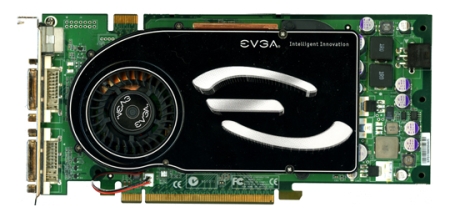
The EVGA GeForce 7800GT has three connections (two DV-I and one S-Video) which will allow you to connect most LCD display devices. DVI can be used to connect the huge and bulky CRT (with adapter) or the lightweight and space-saving LCD monitors. The S-Video can be used to connect your TV monitor, but some of the newest TV’s have DVI connections available. Since I have an old TV, I cannot use the S-Video and test it.
The card itself is pretty big lengthwise (like most after the 6800’s came out), but it is thin enough to only use up one slot in the back of your computer. The heat-sink is very large also keeps the GPU (Graphics Processing Unit) cool at all times (even after overclocking).
eVGA provides a two-year standard warranty. Just visit evga.com or call them at (888) 881-3842 to find out more about the warranty.
INSTALLATION
The installation did not take too long at all (about 5 to 10 minutes). The only thing new you have to do in this installation is to plug in the extra power connector. This card requires more power than the PCI-E interface can provide; you must also have a power supply that is 450 watts or higher as recommended by the manufacturer.
I did not use the drivers that were provided in the CD because I wanted to have the latest up-to-date drivers, so I went to nvidia.com and downloaded the latest available drivers. Up-to-date drivers provide better performance and stability.
Since the card is longer and a bit thicker than older versions, it may be a bit troublesome to install if your computer case is a bit small. So make sure it will fit in your computer before you open the packaging or even purchase it. The thickness does not bother me at all as there are lots of slots on my client’s computer.
DRIVERS
Once you install the drivers an additional tab is added to the “Display Properties Advanced Settings” window; this tab will have the name of the graphics card (in this case GeForce 7800GT or something similar). This tab has all of the settings that can be controlled by the drivers available. You can change the display settings, performance and quality settings, color, refresh rates, multiple or single display options, and some other helpful settings.
There is a utility available at guru3d.com that will give you overclocking ability and some other advanced features like the card temperature monitor, and more. I like this because I do not have to download an additional utility that will do this for me and take up hard disk space and system resources.
EXPERIENCE
I only have about two weeks of experience with this card and my client has been using it for about a month now and says that he is very happy with it. I did take some benchmarks and they were obviously better than my GeForce 6800 GT scores. My client says that his game performances have increased dramatically. He has played Doom3, Half-Life, and some Flight Simulator games with all of the settings at high, and this card never blinks, flickers, or twitch.
I performed benchmarks with 3DMark 2003 and 2005 at stock speed and overclocked speed. Here are the results:
| Test | Speed | Resolution | Score |
|---|---|---|---|
| 3DMark 03 | Stock | 1280 x 1024 | 12,532 |
| 3DMark 05 | Stock | 1280 x 1024 | 6,342 |
| 3DMark 03 | Overclocked | 1280 x 1024 | 13,685 |
| 3DMark 05 | Overclocked | 1280 x 1024 | 7,215 |
By looking at these results, I can proudly say that the EVGA GeForce 7800GT 256 MB graphics card is the best I have ever experienced and the best my client has ever owned. Even at full load and with overclocked speeds, the temperature stays well below 65 degrees Celsius (with the stock heat-sink). Compared to the noise of the heat-sink fan of my processor the heat-sink fan of this graphics card is mute. I could never hear the fan at all.
FINAL THOUGHTS
From my personal experience, I can proudly say that I was fully satisfied and left with wanting more of this new EVGA GeForce 7800GT 256 MB graphics card. It also has the ability to overclock to gain more power do deliver flawless performance and stability without any major disadvantages. The two-year warranty is another advantage that I liked because everyone likes to be protected in case a defect should surface after a year or so of use. The drivers are easy to install and use. My client says that it was worth every penny because he is just astounded by its abilities. My client and I will highly recommend this graphics card to everyone in need of more graphics power.